
What if your home could predict a Chicago cold snap before you even checked the morning forecast? We all know the frustration of watching heating and cooling bills climb during our extreme winters and humid summers. It often feels like a choice between saving money and staying comfortable, but it doesn’t have to be that way. By upgrading to a 4th Generation nest learning thermostat, you can take control of your environment while putting money back in your pocket.
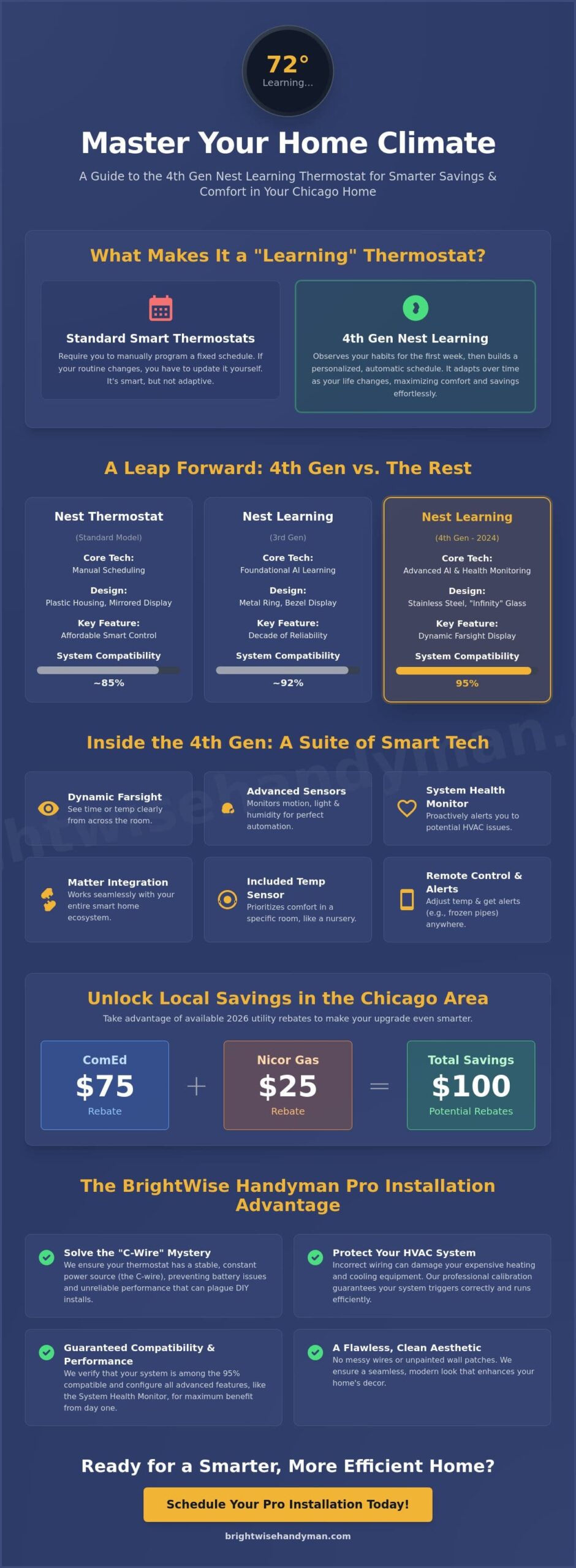
We’ve designed this guide to help you master the latest smart technology, from understanding AI-driven scheduling to navigating the $75 ComEd and $25 Nicor Gas rebates available in 2026. You’ll learn how this device integrates with Matter for total smart home control and why professional calibration ensures your HVAC system stays protected. We’ll also clear up the confusion around C-wire requirements so you can enjoy a clean, reliable installation that just works. Let’s explore how to make your home more efficient and your monthly bills more manageable.
Key Takeaways
- Learn the fundamental difference between standard smart devices and the automated “learning” capabilities that adapt to your daily routine.
- Explore the latest 4th Gen hardware upgrades, including the Dynamic Farsight display that provides clear system data from across any room.
- Confirm your HVAC compatibility and solve the mystery of the “C-wire” to ensure your nest learning thermostat has a reliable, constant power source.
- Discover how to use specialized settings to combat local weather extremes and significantly lower your monthly energy consumption.
- Understand how a professional installation provides a seamless look for your home while guaranteeing your heating and cooling systems trigger exactly when they should.
What is the Nest Learning Thermostat and How Does it Work?
The Nest Learning Thermostat isn’t just a digital dial on your wall. It’s an adaptive piece of technology designed to manage your home’s climate without constant input. While standard smart thermostats let you set a schedule from your phone, a learning model actually watches how you live. It notices when you turn the heat up on a chilly Tuesday morning or down before bed. Over time, it creates a custom program that mirrors your life. We find that this hands-off approach provides the ultimate peace of mind for busy homeowners.
The visual appeal of the 4th Generation model is undeniable. It features a bezel-free, high-resolution display that looks more like a piece of jewelry than a piece of hardware. We appreciate how the polished stainless steel ring adds a touch of modern elegance to any hallway or living room. The device stays dark until you walk into the room, thanks to advanced built-in sensors. These sensors detect motion and light to determine if the house is occupied. If you’re out for the day, the nest learning thermostat automatically switches to an Eco Temperature to save energy. It’s a simple way to ensure you aren’t heating an empty house.
To provide such high levels of automation, the device relies on a suite of internal tools:
- Motion Sensors: These track movement to determine if the house is occupied or empty.
- Light Sensors: The display adjusts its brightness automatically so it’s always easy to read.
- Humidity Sensors: The device monitors moisture levels to help you maintain a comfortable indoor environment.
The ‘Learning’ Phase: Your First Week
When we first complete a smart thermostat setup, the device begins its most important task. During the first seven days, it tracks every manual adjustment you make. If you prefer a warmer living room at 7:00 PM, just turn the dial. The system remembers these preferences. It builds a personalized schedule without you ever having to touch a complicated programming menu. If your routine changes, the device adapts. It continues to refine its logic based on your new habits, ensuring your comfort always comes first.
Remote Control via the Google Home App
Connectivity is at the heart of the modern home. Through the Google Home app, you can adjust your temperature from the office or while on vacation. This is especially helpful during our unpredictable winters. You’ll receive instant alerts if your home temperature drops dangerously low, which helps prevent frozen pipes. The 4th Generation model also supports Matter. This means it works seamlessly with your other smart devices, like security cameras and doorbells. We believe that a home that works together is a home that’s easier to manage.
Comparing the 4th Gen Nest to Previous Models
The 2024 release of the 4th Gen model marked a significant shift in how we interact with our home climate. While the 3rd Gen was a reliable workhorse for nearly a decade, the latest version focuses on a bezel-free, “infinity” glass design that looks more like a high-end timepiece than a utility tool. This isn’t just about looks; the hardware is thinner and more responsive. It also includes a second-generation Temperature Sensor in the box. This allows the system to prioritize the comfort of a specific room, like a nursery or a home office, rather than just the hallway where the main unit sits.
One of the most helpful additions is the Dynamic Farsight feature. In previous models, you had to be quite close to read the screen. Now, the high-resolution display uses animations that you can easily see from across a large room. You can customize the view to show the time, the outdoor temperature, or even the local air quality index. Beyond the visuals, the system features an improved “System Health Monitor.” This AI-driven tool tracks your HVAC performance over time and sends alerts if it detects unusual patterns, such as the furnace taking too long to heat the home. If you’re unsure about the wiring required for these advanced monitoring features, a professional smart thermostat setup can ensure everything is calibrated perfectly.
Nest Learning (4th Gen) vs. Nest Thermostat (Standard)
We often get asked if the premium model is worth the extra cost over the standard version. The standard Nest Thermostat uses a plastic housing and a mirrored display, whereas the 4th Gen uses premium stainless steel. More importantly, the standard model relies on basic scheduling that you program yourself. The 4th Gen actually learns your habits. It also has much broader compatibility. While the standard model works with about 85% of systems, the 4th Gen is designed to work with 95% of 24V residential heating and cooling systems. This makes it a safer bet for older homes in our local community.
Is it Worth Upgrading from a 3rd Gen?
If your 3rd Gen unit is still functioning well, the decision to upgrade usually comes down to energy efficiency and smart home integration. The 4th Gen model includes native Matter support, allowing it to talk to other smart home platforms more reliably. It also meets the rigorous requirements for ENERGY STAR certified smart thermostats, which can lead to more consistent savings. The improved power management also reduces the strain on your HVAC’s control board. If you value a more modern aesthetic and the precision of the new remote sensors, the 4th Gen is a worthy investment for your property stewardship.
Compatibility: Will it Work With Your Existing HVAC?
Before you invest in a nest learning thermostat, you need to confirm it can actually talk to your furnace and air conditioner. Most residential homes in the Chicago suburbs use 24V systems, which are fully compatible. In fact, research shows this 4th Gen model works with approximately 95% of these setups. However, high-voltage systems, like those used for electric baseboard heating, are a different story. If you see thick wires joined by large wire nuts behind your current wall unit, your system isn’t a candidate for this specific upgrade. We always recommend a quick visual check of your current wiring to avoid any surprises on installation day.
One of the biggest sources of confusion we encounter is the “C-wire” or common wire. This wire provides a constant stream of power to your thermostat display. While the 4th Gen model is designed to work in many homes without one, some older systems might experience power pulsing or “chattering” sounds without that dedicated line. If your current setup lacks this wire, you don’t necessarily need to pull new cables through your walls. The Nest Power Connector is an affordable accessory that bridges this gap at the furnace level. For a detailed breakdown of how these technical requirements play out in real-world testing, you can read this in-depth review of the 4th Gen Nest.
Checking Your Wiring: A 5-Minute DIY Test
You can verify your compatibility in just a few minutes. First, turn off the power to your HVAC system at the breaker box for safety. Pop the faceplate off your current thermostat and look at the letters where the wires are connected. We typically look for four or five standard wires:
- R or Rh: This is your power connection.
- W: This wire controls your heating system.
- Y: This wire manages your cooling.
- G: This is for your fan.
- C: This is the Common wire mentioned above.
If you see these labels, you’re likely in good shape. If you find wires that aren’t labeled or you see “120V” or “240V” warnings, stop immediately. Dealing with high-voltage electricity can be dangerous and could damage your new device. We’re here to help with a professional smart thermostat setup if the wiring looks complex or intimidating.
Common Compatibility Red Flags
Even if your system is 24V, a few specific details can complicate things. For example, Nest devices require solid-core copper wiring. If your home has stranded wires, which look like many tiny threads of copper twisted together, they won’t stay secure in the Nest’s push-terminals. Multi-stage heating or cooling systems also require careful attention to ensure your furnace doesn’t run at the wrong speed. Finally, if your home uses a whole-home humidifier or dehumidifier, you’ll need to verify that the 4th Gen model’s backplate has the necessary accessory terminals to control those extra features. We take pride in ensuring every connection is level, secure, and fully tested before we consider the work complete.
Maximizing Energy Savings in the Chicago Suburbs
Living in the Chicago suburbs means dealing with sub-zero wind chills one month and sweltering humidity the next. Your nest learning thermostat is specifically designed to handle these extreme swings. For example, during our humid July heatwaves, the Airwave feature automatically shuts off your air conditioning compressor early while keeping the fan running. This uses the cold air already in your coils to finish cooling your home, which can significantly lower your electricity usage. In winter, the Sunblock feature is essential. It detects when direct sunlight hits the thermostat faceplate. This prevents the device from thinking your room is warmer than it actually is, so your furnace doesn’t shut off prematurely during a cold snap.
We want to make sure you take advantage of every available incentive to lower your upfront costs. For 2026, ComEd offers a $75 rebate for ENERGY STAR certified smart thermostats purchased by December 31. Additionally, Nicor Gas provides a $25 rebate for qualifying installations through the end of the year. When you combine these with the average annual savings of 10% to 12% on heating and 15% on cooling, the device often pays for itself within the first two years of ownership. If you want to ensure your device is configured correctly to qualify for these programs, we offer a professional smart thermostat setup to get everything running right.
Seasonal Calibration for Illinois Homes
Illinois winters require specific safety measures to protect your property. We recommend setting up “Safety Temperatures” to prevent frozen pipes. If your home drops below a certain threshold, the Nest will trigger the heat regardless of your schedule. For draftier historic homes in Elmhurst, the “Early-On” feature calculates exactly when to start the furnace so your house is at the perfect temperature the moment you wake up. You can also use the included 2nd Gen sensor in cold, north-facing rooms to ensure the system doesn’t stop heating until every corner of the house is comfortable.
The Nest Leaf: Gamifying Your Savings
You might notice a small green leaf icon on your display. This isn’t just a decoration; it’s a signal that you’ve chosen a temperature that saves energy. The Leaf is dynamic and changes based on your habits. It pushes you to make small, one-degree adjustments that lead to big changes in your monthly bill. At the end of each month, you’ll receive a Monthly Energy Report. This breakdown shows you exactly how much energy you used compared to the previous month and explains why your usage changed. It’s a transparent way to understand your home’s efficiency and find new ways to save.
Professional Nest Installation: Why It Matters
Choosing the right nest learning thermostat is only half the battle. The other half is ensuring it integrates perfectly with your home’s aesthetic and mechanical systems. While the box says you can do it yourself in 40 minutes, we know that every home in our community has its own quirks. We’ve seen many homeowners attempt an installation only to find a crooked mount or an unpainted patch of drywall where the old unit used to sit. We take pride in providing a clean, level installation that respects the stewardship of your property. If your old thermostat left behind holes or damaged plaster, we can handle the necessary drywall repair and interior painting to make the wall look brand new before the new unit is even clicked into place.
Our approach goes beyond just mounting hardware. We perform rigorous system testing to ensure your furnace and air conditioner trigger exactly when they should. It isn’t enough for the screen to light up; the communication between the device and your HVAC system must be flawless. We also assist with the initial app configuration and Wi-Fi pairing. This ensures you can control your home’s climate from your smartphone before we even leave your driveway. We believe that professional smart thermostat setup should provide you with immediate peace of mind and a system that just works.
Avoiding the DIY ‘Short Circuit’ Nightmare
The biggest risk of a DIY project is the “short circuit” nightmare. One misplaced wire can easily blow a fuse on your HVAC control board. This often leads to an expensive repair bill and a home without heat during a freezing night. We’ve seen these mistakes happen when people try to force a nest learning thermostat into a system that isn’t properly grounded or lacks a C-wire. Our team understands how to calibrate the device to your specific system requirements. We ensure every connection is secure and the wall mount is anchored properly for high-traffic areas. This meticulous attention to detail prevents mechanical failure and keeps your home’s climate control reliable for years to come.
Ready to Upgrade Your Elmhurst Home?
Upgrading to a 4th Gen Nest is a smart move for any local resident looking to slash energy bills and improve home comfort. It’s a high-value investment that adds both aesthetic and functional value to your property. We’re here to simplify that transition by handling the technical heavy lifting for you. We treat your home with the same care as our own, ensuring a tidy workspace and a perfect finish. When you’re ready to start saving and take control of your home’s environment, we’re ready to help. Schedule your professional Nest setup with BrightWise today and enjoy the confidence of a job done right.
Start Saving with a Smarter Home Today
Upgrading to a 4th Generation nest learning thermostat is a strategic move for any homeowner looking to balance comfort with cost savings. You now understand how this technology adapts to your routine and navigates the unique climate challenges we face in the Chicago suburbs. From securing ComEd rebates to solving the C-wire mystery, the path to a more efficient home is clear. We’re here to ensure your transition to smart technology is smooth, professional, and built to last.
We provide local Elmhurst expertise with a focus on clean, precise results. Our team handles the technical integration and any necessary wall repairs so your home looks as good as it feels. We take pride in our mastery of smart home technology and our commitment to treating your property with the utmost respect. If you’re also thinking about boosting your home’s exterior appeal alongside these interior upgrades, exploring front door color ideas for Addison, IL homeowners is a great next step to maximize your property’s curb appeal in 2026. Let’s work together to make your home more comfortable and your energy bills more manageable.
Book Your Smart Thermostat Installation in Elmhurst
Frequently Asked Questions
Does the Nest Learning Thermostat require a monthly subscription?
No, the nest learning thermostat does not require a monthly subscription for its core operations. You’ll have full access to energy reports, remote temperature control, and the automated learning features without any recurring fees. While Google offers optional paid services for home security, the thermostat itself is designed to provide maximum value through a one-time hardware purchase.
Can I install a Nest thermostat if I don’t have a C-wire?
Yes, you can often install this model without a C-wire, as it’s designed to draw power from your existing heating and cooling wires. However, some older or more complex systems might experience power issues or “pulsing” without a dedicated common wire. If your home requires more stable power, we can install a Nest Power Connector at your furnace to solve the problem without the need for new wall wiring.
Will the Nest thermostat work if my Wi-Fi goes out?
Your thermostat will continue to manage your home’s temperature even if your Wi-Fi connection is lost. You can still walk up to the device and turn the stainless steel ring to adjust the heat or cooling manually. While the connection is down, you won’t be able to use the mobile app or receive real-time weather updates, but your programmed schedule and safety temperatures remain active.
How much money can I actually save with a Nest Learning Thermostat?
Homeowners save an average of 10% to 12% on heating and 15% on cooling bills according to long-term energy studies. In our local climate, where winters are harsh and summers are humid, these percentages lead to noticeable monthly savings. By earning “Leaf” icons and using the Airwave feature, you can optimize your system to pay for the device’s cost through reduced utility bills over time.
Is the 4th Gen Nest compatible with Apple HomeKit?
Yes, the 4th Generation model features native Matter support, which allows it to work seamlessly with Apple HomeKit. This is a major upgrade over previous versions that required third-party bridges to talk to Apple devices. You can now use the Home app on your iPhone or ask Siri to adjust the temperature, providing the same level of control enjoyed by Google Home and Alexa users.
What is the difference between the Nest Learning Thermostat and the Nest Thermostat E?
The main differences are the premium materials and the level of system compatibility. The nest learning thermostat features a high-resolution glass display and a metal ring, whereas the discontinued Nest E used a frosted plastic screen. The Learning model also works with a wider range of multi-stage HVAC systems and includes a remote temperature sensor in the box to help balance cold spots in your home.
Does the Nest Learning Thermostat work with Alexa and Google Assistant?
Yes, the device is fully compatible with both Alexa and Google Assistant for convenient voice control. You can simply say, “Alexa, set the hallway to 72 degrees,” or ask Google to check the indoor humidity. This hands-free functionality makes it easy to manage your home’s comfort while you’re cooking, cleaning, or relaxing on the couch without needing to reach for your phone.
How long does it take for the Nest to learn my schedule?
It typically takes about one week of manual adjustments for the device to build a reliable schedule. During this initial period, you should turn the dial up or down whenever you want a change. The system tracks these habits and begins to automate the transitions for you. If your routine changes, the device continues to learn and will adjust your schedule to match your new lifestyle patterns.
