
A box from the store doesn’t protect your home; a strategic installation does. You’ve likely considered adding a google nest camera to your property, but the reality of drilling into Elmhurst brick or losing a Wi-Fi signal through thick siding can be daunting. We understand that anxiety. It’s one thing to buy the tech, but it’s another to ensure it survives a negative twenty degree Chicago night without failing. Every home deserves a little extra glow, and that starts with a security system that works exactly when you need it most.
We agree that your peace of mind is worth the effort of doing the job right the first time. In this guide, you’ll learn how to choose the best hardware for our local climate and how to optimize your setup for total property coverage. We’ll preview the August 2025 updates to Google Home Premium subscription tiers, explain the strict all-party consent laws for audio in Illinois, and show you how to participate in the Elmhurst Police Department’s voluntary Video-Sharing Partnership. By the end, you’ll have a clear plan for a professional, clean look that keeps your family safe through every season.
Key Takeaways
- Identify the best hardware for your specific home style, whether you live in a classic Elmhurst Bungalow or a modern Tudor.
- Master the technical setup of your google nest camera by testing Wi-Fi strength before drilling into masonry or wood siding.
- Reduce false alerts by customizing activity zones to ignore heavy traffic on York Road while maintaining clear views of your porch.
- Learn how to navigate Illinois audio privacy laws and participate in the Elmhurst Police Department’s voluntary video-sharing program.
- Discover the benefits of a professional, ladder-free installation that ensures your system survives a harsh Chicago winter without messy wires.
What is a Google Nest Camera and Why Do Elmhurst Residents Need One?
A google nest camera is more than just a piece of hardware mounted to your siding. It is a sophisticated, AI-driven security solution designed to protect your most valuable asset. At BrightWise, we believe every home deserves a little extra glow. This means providing a sense of safety that allows you to sleep better at night. We see security cameras as a partner in home stewardship. By integrating these devices into the Google Home app, currently on version 4.2 as of April 2026, you create a unified smart home experience that you can monitor from your phone or tablet.
The Security Benefits for Suburban Chicago Homes
Elmhurst neighborhoods are vibrant and family-oriented, but they aren’t immune to suburban challenges. Porch piracy remains a significant concern in the Chicago Western Suburbs. During the 2025 holiday season, local reports of package theft highlighted the need for visible, smart deterrents. A well-placed camera does more than record footage. It discourages bad actors before they ever reach your doorstep. These systems also prove invaluable during extreme Illinois weather. When a blizzard hits or heavy winds roll through the plains, you can check your property boundaries and driveway from the warmth of your living room. We recommend pairing cameras with a smart doorbell to achieve 360-degree coverage of your lot, ensuring no blind spots remain for intruders to exploit.
Understanding the Google Nest Ecosystem
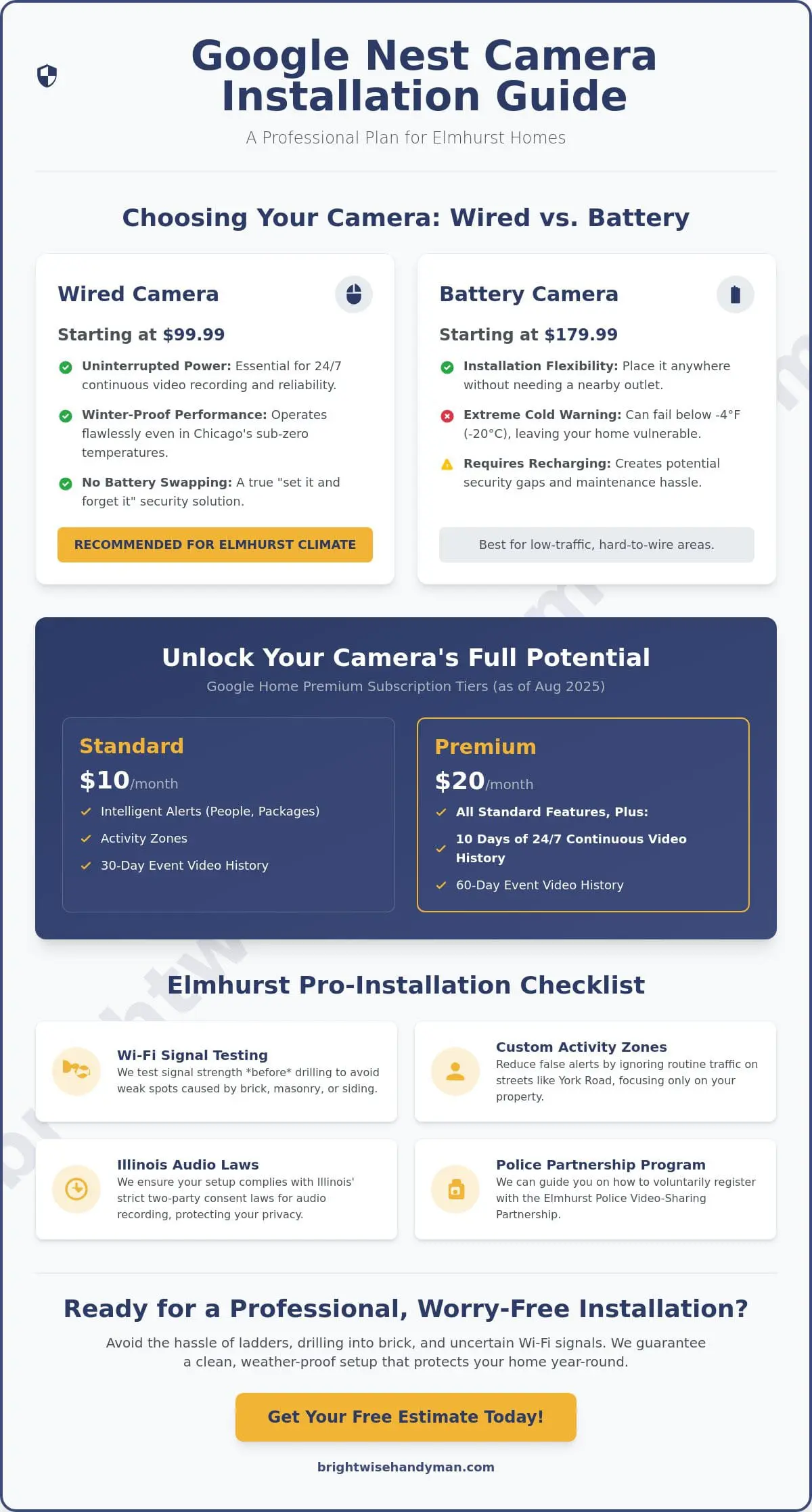
The Google Nest product line offers several options tailored to different mounting needs and architectural styles. As of April 2026, the lineup includes the Wired Indoor model at $99.99 and the versatile Battery Indoor/Outdoor model at $179.99. Wired options are ideal for permanent, high-traffic areas where you want the reliability of constant power. Battery models offer flexibility for areas where running a power line is difficult, such as a detached garage or a far corner of a backyard.
To get the most out of your google nest camera, you need a subscription to manage your data. In August 2025, Google updated its pricing for the rebranded Google Home Premium service. The standard tier is now $10 per month, while the Premium tier, which offers 10 days of 24/7 continuous video recording for wired cameras, is $20 per month. Nest Aware serves as the cloud-based brain of your security system. It provides the intelligence needed to distinguish between a delivery driver and a swaying tree branch, ensuring you only get the alerts that actually matter.
Choosing the Right Nest Camera for Your Elmhurst Property
Elmhurst is famous for its diverse architecture, ranging from historic brick bungalows to sprawling Dutch Colonials. Each style presents unique mounting challenges. For example, the thick masonry of a classic bungalow can severely degrade Wi-Fi signals, while the high peaks of a Tudor might require specialized ladders to reach the ideal vantage point. We’ve seen many DIY attempts fail because the installer didn’t account for the density of the building materials. Choosing the right google nest camera involves more than just picking a model; it requires understanding how your home’s bones interact with the technology.
The “Cold Weather Objection” is a reality for anyone living in the Chicago Western Suburbs. Illinois winters often see temperatures plummet well below zero. While battery-powered cameras offer a quick setup, they often fail when the mercury hits -4°F. Lithium-ion batteries lose their ability to hold a charge in extreme cold, which can leave your property vulnerable during a January blizzard. We generally recommend wired models for permanent security. These ensure your system remains active 24/7, regardless of how much snow is piling up on the porch. Narrow suburban lots also require a specific field of view. You need a lens wide enough to cover your side yard but precise enough to capture faces at the front door.
Indoor vs. Outdoor: Where to Place Your Cams
Placement is everything on narrow suburban lots. You want to cover your front porch and the alleyway behind your detached garage without infringing on your neighbor’s privacy. High-density blocks in Elmhurst mean your camera might accidentally peer into a side window next door. It’s vital to secure your home security cameras by adjusting the physical angle and digital privacy zones. Indoors, a google nest camera is perfect for nursery safety or monitoring pets while you’re at work.
Powering Your Security: Wired vs. Battery
Wired installations are the gold standard for reliability. They allow for continuous recording and never require a recharge. If you have a sunny backyard spot, solar panel accessories can provide a middle-ground solution for battery models. However, for the best results in our climate, a hardwired connection is the right choice. If the thought of running wires through your attic feels overwhelming, we can provide a clean, professional installation that hides all the messy cables and ensures a steady power supply.
Step-by-Step: How to Install Your Google Nest Camera
While manufacturer descriptions often claim a five-minute setup, a professional-grade installation takes more care. We believe in getting it right the first time to avoid the frustration of a dropped signal or a loose mount. Before you reach for a screwdriver, you must ensure your digital foundation is solid. A secure home starts with a stable connection, especially when dealing with the dense building materials common in the Chicago Western Suburbs.
Pre-Installation: The Wi-Fi Strength Test
Take your smartphone to the exact spot where you plan to mount your google nest camera. Run a speed test to check your upload capacity. Google recommends at least 2 Mbps of upload speed for each 1080p camera on your network. If you’ve upgraded to the newer 2K models released in early 2026, you may need even more bandwidth. For larger Elmhurst homes, a standard router might not reach through several layers of historic plaster or thick brick. If your speeds are lower than 2 Mbps at the mounting site, we suggest installing a Wi-Fi mesh system to boost the signal before you start drilling.
Once the signal is verified, open the Google Home app, which is currently on version 4.2. Follow the prompts to scan the QR code on your device. This links the camera to your account and allows you to view the live feed on your phone. Keeping the app open during the physical install is essential for real-time angle adjustments.
Mounting on Different Surfaces (Brick, Siding, Stucco)
Installing on a classic Elmhurst brick bungalow requires specialized equipment. You’ll need a hammer drill and carbide-tipped masonry bits to create clean holes without cracking the surrounding face brick. We always use high-quality anchors to ensure the mount remains secure through heavy Illinois winds. If your home has wood or vinyl siding, the process is different. We use stainless steel screws that won’t rust or leave unsightly streaks on your exterior over time.
To achieve the BrightWise glow, we focus on a clean aesthetic. This means hiding wires behind siding or using weather-resistant conduits that match your home’s trim. We also prioritize the perfect angle. A camera mounted too high only captures the tops of heads, which isn’t helpful for identification. We aim for a height of seven to nine feet. This keeps the unit out of reach of potential intruders while ensuring the AI can clearly identify faces as they approach your porch. We treat your home like it’s our own, ensuring every hole is sealed with outdoor-rated caulk to prevent moisture from entering your walls during the spring thaw.
Optimizing Your Nest System for Chicago’s Western Suburbs
Mounting your hardware is only half the battle. To truly benefit from your google nest camera, you must fine-tune the software to match the rhythm of your neighborhood. A camera that pings your phone every time a car drives by is a nuisance, not a security tool. We focus on eliminating notification fatigue so that when your phone does buzz, you know it is important. This starts with defining your digital boundaries within the Google Home app.
If you live near high-traffic corridors like York Road or North Avenue, your camera will naturally see a lot of movement. You should configure Activity Zones to exclude the street and sidewalk. By drawing these custom shapes in the app, you tell the system to only alert you if someone enters your actual property line. This is especially vital for narrow Elmhurst lots where the front door is only a few feet from the public walkway. We also recommend adjusting motion sensitivity during the winter. Heavy lake-effect snow or blowing debris can trigger false alarms. Lowering the sensitivity slightly during a blizzard ensures you aren’t woken up by a snowflake hitting the lens at 2:00 AM.
Automation makes your security system feel seamless. Setting up “Home & Away” routines allows your cameras to react to your location. You can program indoor cameras to turn off automatically when your phone’s GPS shows you’ve arrived home from work. When you head out for dinner in downtown Elmhurst, the system recognizes your departure and arms every device. This ensures your privacy while you’re home and total protection while you’re away.
Managing Connectivity and Bandwidth
Suburban internet networks often face congestion during peak usage times, typically between 5:00 PM and 9:00 PM. If you have multiple users streaming or gaming, your cameras may struggle for bandwidth. You can adjust the video quality settings for each google nest camera to find a balance between high-definition clarity and connection stability. If a camera frequently shows as “Offline” during these hours, it is likely a signal bottleneck. A simple restart through the app often resolves temporary glitches without erasing your custom activity zones or saved settings.
Advanced Features: Familiar Face Detection
The Google Home app, which is on version 4.2 as of April 2026, uses AI to recognize the people who visit your home most often. You can “teach” the system to identify family members and frequent guests. Instead of a generic “Person detected” alert, your phone will tell you that the kids are home from school. This feature requires a Google Home Premium subscription and offers robust privacy controls. You can review and delete face data at any time. For a hands-free experience, we suggest linking your cameras with Google Assistant. This allows you to view your live feed on a Nest Hub or smart TV with a simple voice command. If you want to ensure your system is perfectly tuned for your specific property, we can optimize your smart home setup to give you total peace of mind.
Professional Nest Camera Installation in Elmhurst: The BrightWise Difference
We believe that your time is your most valuable resource. While many homeowners enjoy a weekend project, setting up a google nest camera requires a level of precision that goes beyond basic assembly. At BrightWise, we bring the authority of a seasoned expert and the friendliness of a dependable neighbor to every job. Our “No Job Too Small” philosophy means we’re just as happy to install a single doorbell as we are to wire a comprehensive full-home security system. We treat your home like it’s our own, ensuring that every mounting bracket is level and every wire is tucked away out of sight.
Professional mounting adds years to the life of your hardware. We don’t just screw a device into your siding. We use weather-rated sealants and heavy-duty anchors designed to withstand the humidity of an Illinois summer and the deep freezes of winter. This meticulous approach prevents the camera from shifting over time. It ensures your activity zones stay exactly where you programmed them, even after a season of heavy winds. By choosing professional labor, you’re investing in a system that works reliably from day one.
Why DIY Isn’t Always the Brightest Choice
The risks of a DIY installation often outweigh the perceived savings. Climbing a ladder to reach second-story eaves is inherently dangerous, especially on the uneven ground common around older Elmhurst foundations. Fall injuries are a serious concern for homeowners attempting to reach the high vantage points needed for total property coverage. There is also a risk to your home’s infrastructure. We’ve seen well-intentioned DIYers drill into hidden electrical lines or water pipes behind walls. These mistakes lead to expensive repairs that far exceed the cost of a professional setup. Before you attempt a smart home install on your own, it’s worth understanding the common pitfalls that cause even tech-savvy homeowners to end up with tangled wires and devices that won’t stay connected. Finally, poor initial placement is the leading cause of “Offline” errors. If a google nest camera is mounted just a few inches too far from a router, it will struggle to maintain a connection during peak usage times.
Schedule Your Smart Home Consultation Today
We are proud of our local roots in the Chicago Western Suburbs. Our team understands the specific needs of Elmhurst and Villa Park residents because we live and work in this community. We bridge the gap between traditional craftsmanship and modern technology. Whether you need help navigating the April 2026 software updates or simply want someone to do the heavy lifting, we are here to help. Let BrightWise Handyman handle your Google Nest installation today! We promise to arrive on time, respect your space, and leave your home with that extra glow of safety you deserve.
Secure Your Elmhurst Property for the Year Ahead
A truly effective security system requires more than just high-tech hardware. It demands a thoughtful plan that accounts for the unique architecture of the Chicago Western Suburbs and the harsh realities of our local climate. By choosing the right google nest camera and optimizing it for the April 2026 software standards, you ensure your family remains protected through every blizzard and summer storm. You now have the tools to navigate the August 2025 subscription changes and understand why specialized mounting for brick bungalows is essential for long-term stability.
We’re here to help you achieve that perfect setup without the risks of DIY ladder work or the frustration of connectivity gaps. Our expert smart home technicians provide meticulous craftsmanship guaranteed to last. We’ve spent years serving Elmhurst and the surrounding Western Suburbs; we treat every home like it’s our own. Ready to get started? Get a Professional Google Nest Camera Quote in Elmhurst today. We look forward to giving your home the extra glow of safety it deserves.
Frequently Asked Questions
Do I need a subscription to use a Google Nest camera in Elmhurst?
You don’t need a subscription for basic live views, but you do need one for video history. As of August 2025, the Google Home Premium standard tier costs $10 per month and provides 30 days of event history. The $20 per month tier offers 60 days of history and 10 days of continuous 24/7 recording for wired devices. Without a plan, you’ll only receive alerts and a live stream.
How long does the battery last on a Nest Cam during an Illinois winter?
Battery life decreases by as much as 50% when temperatures drop below freezing. In a typical Illinois winter where temperatures can hit -4°F, lithium-ion batteries often stop charging or holding power entirely. We recommend using wired power for any google nest camera installed in an exposed outdoor area. This prevents the frustration of your security system failing during a January blizzard.
Can a Google Nest camera record 24/7?
Yes, but only if you have a wired camera and a Google Home Premium subscription. Battery-powered models are designed to record only when they detect motion to save energy. If you want a 24/7 stream of your Elmhurst property, you must install a wired model and subscribe to the $20 monthly plus tier. This allows for ten days of continuous, non-stop video history.
Is it better to mount my camera on brick or wood siding?
Both surfaces are suitable if you use the correct mounting techniques. Brick offers a more permanent and secure mount, but it requires a hammer drill and masonry bits to prevent cracking the face brick. Wood siding is easier to drill; however, we always use outdoor-rated caulk to seal the holes. This prevents moisture from entering your home’s frame during the spring thaw.
What happens to my Nest camera if the Wi-Fi goes out?
Your camera will stop streaming live video, but newer models can store up to one hour of local event footage. Once your internet connection is restored, the google nest camera uploads those clips to the cloud automatically. This ensures you don’t lose evidence of an incident just because your router rebooted or the neighborhood service flickered for a few minutes.
Can I install a Google Nest camera myself or should I hire a handyman?
While DIY is an option for battery models, we recommend professional installation for anything involving ladders or wiring. We’ve seen homeowners struggle with drilling into historic Elmhurst brick or failing to optimize the field of view. Our team ensures a clean finish with no exposed wires and a rock-solid connection. We treat your home like it’s our own during every step.
How many Nest cameras can my home Wi-Fi handle?
Most residential Wi-Fi networks can handle three to five cameras before you notice a lag in internet speeds. Each 1080p camera requires at least 2 Mbps of upload speed to function correctly. If you plan on a larger system, we suggest upgrading to a mesh Wi-Fi network. This helps maintain a strong signal across your entire lot, from the front porch to the back garage.
Do Google Nest cameras work with Amazon Alexa?
Yes, Google Nest devices are compatible with Amazon Alexa-enabled displays and speakers. You can stream your camera feed to an Echo Show or use voice commands to check your front porch. We can help you integrate these different platforms during our smart home consultation. This ensures your entire ecosystem works together to give your home that extra glow of safety.
