
You’ve just unboxed a $239.99 Google Nest Learning Thermostat, but as you pull the old unit off your Elmhurst living room wall, you’re met with a mess of wires that don’t match the manual. It’s a frustrating moment that many of our neighbors in the Western Suburbs face. Learning how to install a thermostat shouldn’t feel like a high-stakes gamble with your home’s electrical panel. We believe every home deserves a little extra glow, and that starts with a climate control system you can trust. Whether you’re working with a historic property or a modern build, we’re here to ensure your DIY project is a success.
We know the fear of damaging an expensive HVAC system or getting lost in a sea of confusing wire colors is enough to make anyone hesitate. This guide will help you master the step-by-step process of upgrading your home’s technology while adhering to the 2021 International Code Series used here in Elmhurst. You’ll learn how to handle missing C-wires, configure the latest 2026 smart features, and potentially save 10% on your annual energy bills. We’ll walk you through the preparation, the wiring, and the final setup to give you total confidence in your home’s comfort.
Key Takeaways
- Identify your specific HVAC system type to ensure your new device is compatible and avoid frustrating “short-circuits” in your project planning.
- Master exactly how to install a thermostat in older suburban homes by decoding the C-wire challenge and standard terminal color-coding.
- Follow our safe, step-by-step guide to power down your system and label your existing wiring for a seamless transition to smart technology.
- Learn to troubleshoot common post-installation hurdles like “short cycling” and blank screens to keep your climate control running efficiently.
- Recognize the critical red flags that signal it is time to call an expert to ensure your home’s long-term safety and peace of mind.
Essential Preparation for Thermostat Installation in Elmhurst Homes
Proper preparation is the difference between a cozy evening and a cold night in the Western Suburbs. Before you dive into the technical details of what is a thermostat, you must understand your specific HVAC setup. Many Elmhurst houses feature older boilers or forced-air systems. Knowing if yours is heat-only, cool-only, or a combination prevents you from buying a device that isn’t compatible with your equipment. We believe that doing the homework now ensures your system provides that perfect glow later without unnecessary stress.
We always start in the basement or the utility closet. Locate your main service panel and find the breaker labeled “Furnace” or “HVAC.” In many older homes in our community, these labels are faded or inaccurate. We never touch a wire until we’ve used a non-contact voltage tester. This tool glows or beeps if power is still present. It’s a simple check that protects you from a 24V or 120V shock. Safety isn’t just a suggestion; it’s our standard for every job, no matter the size.
Gathering the Right Tools for the Job
You don’t need a massive toolbox to master how to install a thermostat. We suggest keeping a few basics nearby to ensure the job stays organized and efficient. You’ll need Phillips and flathead screwdrivers, needle-nose pliers for stubborn wires, and a small level to keep the wall plate straight. We also recommend using painters tape for labeling wires immediately as you disconnect them. Your smartphone is your best asset during this stage. Take a clear “before” photo of the original wiring. This single image saves hours of guesswork if you need to reference the original terminal connections later.
Compatibility Check: Smart vs. Traditional Units
Not all thermostats are equal, and your home’s age often dictates your options. Most residential systems in Elmhurst use low-voltage (24V) wiring. However, some older baseboard heaters utilize line-voltage systems at 120V or 240V. A modern smart thermostat won’t work on line-voltage without a specific adapter. You also need to verify the “Common” or C-wire. Modern units like the 2026 Nest or Ecobee models require this for constant power. Since the Illinois Energy Conservation Code mandates programmable units, choosing a compatible smart device is a great way to meet standards while lowering your bills. We treat your home like our own, which means we help you verify that your new unit matches your existing furnace perfectly before you ever pick up a screwdriver.
Decoding Thermostat Wiring and the C-Wire Challenge
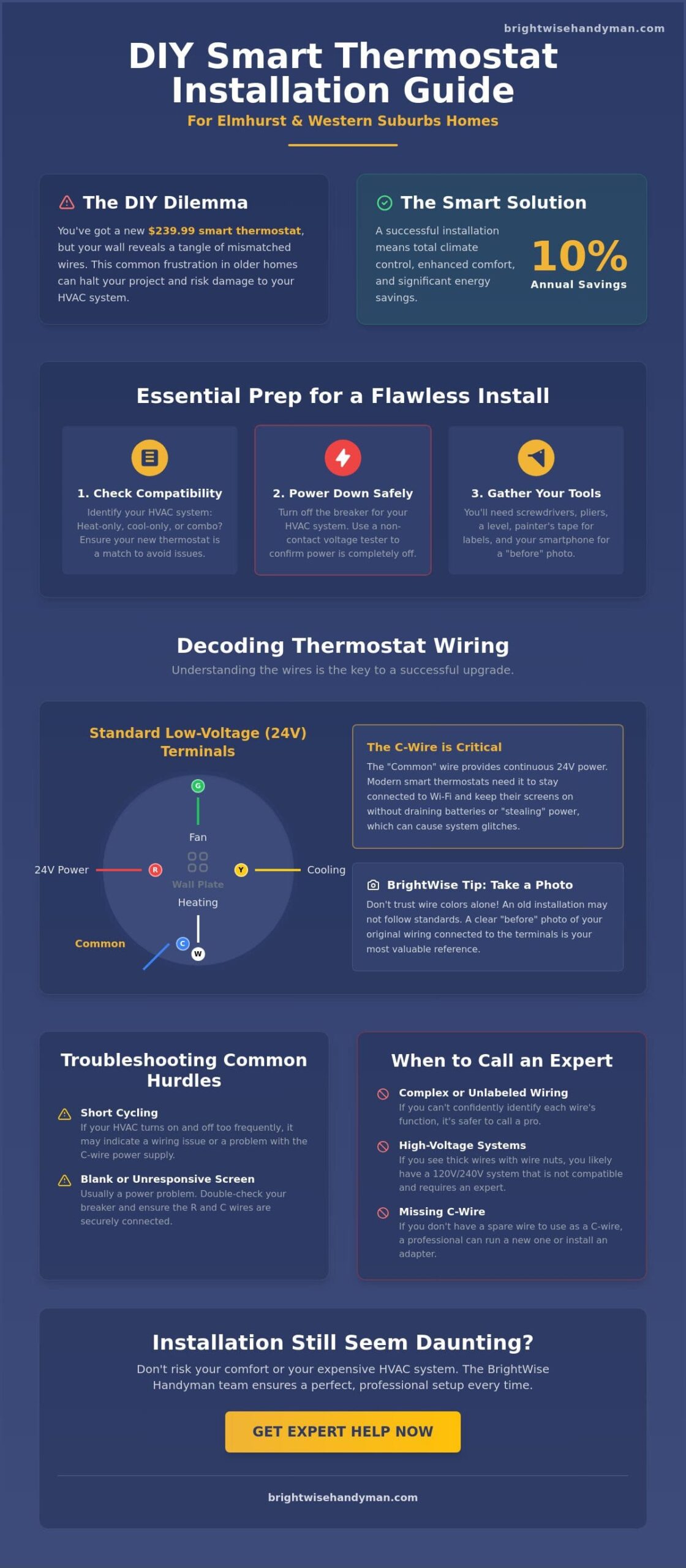
Understanding the bundle of wires behind your wall is the most critical part of learning how to install a thermostat. We often find that homeowners in Elmhurst are surprised by the variety of wiring configurations in our local housing stock. The most important wire for modern upgrades is the C-wire, or common wire. This wire provides a continuous 24V power loop that allows smart thermostats to stay connected to your Wi-Fi and keep their displays lit. Without it, your new device might “power steal” from other circuits, which can lead to system glitches or a dead battery during a cold Chicago snap.
Standard color-coding usually follows a predictable pattern. Red (R) handles power, Green (G) controls the fan, Yellow (Y) manages cooling, and White (W) is for heat. The C-wire is typically blue or black. However, we’ve learned through years of service in the Western Suburbs that you should never assume a wire’s function based on its color alone. An installer thirty years ago might have used whatever wire was available. If you miswire these terminals, you risk blowing a fuse on your furnace control board. This is why the “BrightWise Tip” is non-negotiable: Always photograph your old wiring while it is still connected to the original terminals. If you feel uncertain about these connections, our team is always ready to provide professional smart home assistance to ensure everything is perfectly calibrated.
Upgrading your system isn’t just about convenience; it’s about efficiency. According to the U.S. Department of Energy, proper scheduling can lead to significant energy-saving benefits, potentially cutting 10% off your annual heating and cooling costs. We believe every home deserves a little extra glow, and that starts with a safely powered climate control system.
What to Do if Your Home Lacks a C-Wire
Many older Elmhurst electrical systems only have four wires. First, gently pull the wire bundle out an inch or two to see if a fifth wire is tucked back into the wall cavity. If not, you can use a C-wire adapter kit, which is a common solution for 2026 smart home upgrades. Another option is the “G-wire” workaround. This involves using the fan wire to provide power, but it comes with a trade-off. You will lose the ability to run your fan independently of your heating or cooling cycles.
Handling Brittle or Short Wires
In historic homes, copper wiring can become oxidized or brittle over time. If your wires are too short to reach the new terminals, we suggest using wire nuts and small “pigtail” extensions to give yourself more slack. Use a small flashlight to inspect the hole in the wall for any signs of singed insulation or moisture. We always clean oxidized copper ends with a light touch of fine-grit sandpaper to ensure a reliable, honest connection. We treat your home like it’s our own, and that means ensuring every connection is secure before we snap the new faceplate into place.
Step-by-Step Guide: How to Install a Thermostat Safely
Now that you have prepared your tools and decoded your wiring, it is time to begin the physical installation. We know that opening up a wall can feel intimidating. However, following a disciplined process ensures your home remains safe and your HVAC system stays protected. Learning how to install a thermostat is a rewarding project that provides immediate results in comfort and efficiency. We believe in doing the job right the first time, so we always start with the most vital safety step: confirming the power is completely off at the main service panel in your basement or utility room.
Once you’ve verified the power is dead with your voltage tester, remove the old thermostat cover. Use the labels provided with your new device to mark each wire based on the terminal letter it is currently connected to, not just the wire color. This is where your “before” photo from the previous section becomes your best friend. After labeling, unscrew the old baseplate. We recommend wrapping the wire bundle around a pencil or securing it with a piece of painters tape to the wall. This simple trick prevents the wires from slipping back into the wall cavity, a common mistake that can turn a thirty-minute job into a frustrating afternoon of fishing through plaster.
Mounting and Leveling the New Baseplate
Many homes in the Western Suburbs feature older plaster walls or uneven drywall that can make mounting difficult. When you position the new baseplate, use the included drywall anchors to ensure the unit stays secure for years to come. We always use a small level to verify the plate is perfectly straight. A crooked thermostat isn’t just an eyesore; in some older mercury-bulb models, it can actually affect temperature accuracy. If your new smart thermostat is smaller than the old one, you might see unpainted spots or old screw holes. We suggest using a matching trim plate, often included in the box, to provide a clean and professional finish without the need for immediate wall repairs.
Final Connections and Powering Up
With the baseplate secure, insert each labeled wire into its corresponding terminal on the new unit. Most 2026 models use a “trap door” or push-button terminal. You should feel a slight click and see the wire seat firmly. Ensure no bare copper is touching adjacent wires, as this can cause a short circuit. After snapping the faceplate onto the base, return to your breaker panel and restore power. Your new device will likely take 60 to 90 seconds to boot up. We always perform a “click test” by setting the temperature a few degrees above or below the current room heat. You should hear a distinct click from the thermostat followed by the sound of your furnace or air conditioner engaging. This confirmation gives you the peace of mind that your home stewardship project was a total success.
Troubleshooting Common Installation Hurdles in Suburb Homes
Even when you follow every step on how to install a thermostat, unique challenges can arise once you restore power. We’ve seen many Elmhurst homeowners feel a moment of panic when their new 2026 smart display remains dark. Before you assume the device is faulty, check the safety switch on your furnace or air handler door. If that panel isn’t seated 100% correctly, the system won’t send power to the wall unit. Another common issue in our Western Suburbs homes is the “No Power to RC/RH” error. This usually means the R-wire isn’t making a solid connection or you have a blown three-amp or five-amp fuse on your furnace control board. We believe in providing peace of mind, so we suggest a quick double-check of your wiring seated in those “trap door” terminals before calling for help.
Short cycling is another hurdle that can frustrate even the most meticulous DIYer. This happens when your heat or AC turns on and off too rapidly, which can lead to higher energy bills and equipment wear. In older houses, this is often caused by a large hole behind the baseplate. Drafty air from the wall cavity or basement can blow directly onto the thermostat’s sensors, tricking it into thinking the room temperature has shifted. We suggest plugging that hole with a small amount of plumber’s putty or wall insulation. If these technical glitches feel overwhelming, you can always reach out for expert thermostat troubleshooting and repair to get your system back on track.
Wi-Fi Connectivity and Smart App Setup
Once the screen is lit, you’ll need to pair the device with your home network. Most smart home technology from brands like Google Nest or Ecobee prefers the 2.4GHz Wi-Fi band because it penetrates the thick plaster walls common in Elmhurst better than 5GHz bands. Open your specific app and follow the prompts to scan the QR code on the back of the faceplate. We recommend setting your first schedule immediately. By programming your system to pull back 7 to 10 degrees while you’re at work, you can maximize your energy savings and lower your monthly utility costs. We want your home to have that extra glow of efficiency from day one.
Managing Wall Damage in Older Homes
Upgrading from a bulky 1990s-era unit to a sleek 2026 model often reveals unpainted drywall or old screw holes. We treat your home like our own, so we don’t like leaving a messy wall behind. Use a small amount of lightweight spackle to fill old holes and sand them smooth once dry. If you have vintage wallpaper or don’t have matching paint, a trim plate is your best friend. These plates sit behind the thermostat and hide any imperfections from the previous installation. This ensures your new technology looks like it belongs in your space rather than being a last-minute addition. We value craftsmanship, and these small finishing touches make a world of difference in your home’s overall aesthetic.
When to Call an Elmhurst Handyman for Your Smart Home Setup
While learning how to install a thermostat is a rewarding way to take ownership of your home’s efficiency, certain situations demand the eye of a meticulous craftsman. We often encounter “red flags” that move a project beyond a simple weekend DIY task. If you pull off your old unit and find thick, 120V or 240V line-voltage wires, or if you notice singed insulation and melted plastic, stop immediately. These are signs of electrical issues that require professional intervention. We believe every home deserves a little extra glow, and that starts with a system that is fundamentally safe and code-compliant.
Professional installation also serves as a safeguard for your equipment. Modern devices like the $239.99 Google Nest Learning Thermostat or the Ecobee Smart Thermostat Premium are significant investments. Many manufacturers provide more streamlined warranty support when a record of professional installation exists. Local regulations also play a role in this process. The City of Elmhurst requires permits for any major revisions to electrical services or new HVAC locations. We understand the 2021 International Code Series and the Illinois Energy Conservation Code requirements. We ensure your home meets these standards while delivering the 10% annual energy savings promised by the U.S. Department of Energy.
The Benefits of Professional Smart Home Installation
We arrive on time and respect your space, ensuring the only thing we leave behind is a perfectly functioning thermostat. Our team provides the “BrightWise Difference” by going beyond the basic wiring. We offer expert configuration of smart features tailored to the local Chicago climate. This includes setting up multi-room sensing to prioritize your bedrooms at night and your living areas during the day. We also ensure your device is Matter compatible, allowing for seamless integration with your other smart home technology. We don’t just finish a task; we build a relationship based on trust and quality craftsmanship.
Scheduling Your BrightWise Consultation
If the wiring feels overwhelming or you simply want the peace of mind that comes with an expert touch, we are here to help. Handyman hourly rates in the Elmhurst area typically range from $50 to $80, and we provide transparent communication regarding every step of the process. We are proud members of the Elmhurst, Villa Park, and Lombard communities. Our goal is to be the partner you call for every home stewardship need. We treat your home like it’s our own, prioritizing long-term reliability over quick fixes. Let BrightWise Handyman handle the wiring for you!
Take Control of Your Home’s Comfort and Efficiency
Upgrading your climate control is one of the most effective ways to modernize your living space. By following the 2021 International Code Series standards, you ensure your home remains both safe and efficient. You now know that success starts with a voltage tester and a clear photo of your old wiring. Mastering how to install a thermostat allows you to unlock those 10% annual energy savings reported by the U.S. Department of Energy. We believe every project, whether it’s a simple wire label or a complex smart hub integration, contributes to the stewardship of your property.
If you run into a missing C-wire or simply want the peace of mind that comes with meticulous craftsmanship, we’re ready to help. We are expert smart home installers who have proudly served Elmhurst and the Western Suburbs for years. We treat your home like it’s our own, ensuring every connection is secure and every faceplate is level. Schedule your professional thermostat installation in Elmhurst today! We look forward to giving your home that little extra glow it deserves.
Common Questions About Thermostat Installation in Elmhurst
Do I need to turn off the power to install a thermostat?
Yes, you must turn off the power at the main service panel before you begin. This critical safety step protects your furnace’s sensitive control board from short-circuiting during the process. We always suggest using a non-contact voltage tester to confirm the wires are dead before you touch them. Safety is our priority for every neighbor in the Western Suburbs.
What is a C-wire and do I really need one for a smart thermostat?
A C-wire, or common wire, provides a continuous 24V power loop to your device. While older battery-operated models didn’t require them, most 2026 smart thermostats need this constant power for Wi-Fi and high-resolution displays. If your older Elmhurst home lacks this wire, you will need to install a C-wire adapter kit to ensure reliable operation.
Can I install a Nest or Ecobee thermostat in an older Elmhurst home?
You can install these modern units in most older homes as long as they use a standard 24V low-voltage system. Many historic properties in our community have been retrofitted with modern HVAC equipment over the years. However, you must verify that you don’t have a 120V or 240V line-voltage system, which is common in older baseboard heaters and is not compatible with standard smart units.
How long does it typically take to install a new thermostat?
A standard installation usually takes between 30 and 60 minutes for a straightforward replacement. This timeframe includes labeling your existing wires, mounting the new baseplate, and completing the initial app configuration. If your project requires fishing a new wire through the wall or installing a power adapter, the job can take closer to two hours to complete correctly.
What should I do if my new thermostat isn’t turning on the heat or AC?
First, ensure the furnace door is completely closed to engage the safety kill switch. Many homeowners overlook this after inspecting their system. If the door is secure, double-check that each wire is seated firmly in its terminal and that you haven’t blown a five-amp fuse on the furnace control board. We believe in getting it right the first time, so we always verify these connections before finishing a job.
Is it worth hiring a handyman to install a thermostat?
Hiring a professional is an excellent choice if you want to ensure your manufacturer warranty remains valid and your home stays safe. With local handyman rates in the Elmhurst area ranging from $50 to $80 per hour, it is an affordable way to avoid the stress of wiring errors. We provide meticulous craftsmanship to give your home that extra glow of reliability and peace of mind.
How do I know if my HVAC system is compatible with a smart thermostat?
Remove your current thermostat cover and look at the wiring. If you see thin, multi-colored wires, your system is likely a standard 24V setup compatible with modern technology. If you see thick wires capped with wire nuts, you probably have a high-voltage system. These require specific controllers that differ from standard smart home models.
What tools do I need for a DIY thermostat replacement?
To master how to install a thermostat, you will need a Phillips head screwdriver, needle-nose pliers, and a small level. A smartphone is essential for taking “before” photos and following the manufacturer’s digital setup guide. We also suggest using painters tape to label your wires as you disconnect them to prevent any confusion during the final hookup.
